


Published: 2026-10-03
Table of contents
- What a local LLM actually is
- Why run a model on your own machine
- The fastest way in: Ollama in two commands
- The numbers I measured on a 16 GB M5
- 3B vs 7B: which one should you run
- Does the code it writes actually run?
- What a local LLM is good at, and what it is not
- Observability and evaluation come next
- FAQ
A local LLM is a language model that runs entirely on your own computer, with no API call leaving the machine. I kept reading that a modern laptop can now run one comfortably, so I stopped guessing and measured it. I installed Ollama on a 16 GB Apple M5, pulled a 3-billion-parameter model and a 7-billion-parameter model, and recorded tokens per second, memory use, load time, and whether the Python they generated actually passed tests. Everything below is a real measurement from that session, not a vendor claim. If you are deciding whether a local LLM is worth setting up, this is what it looks like in practice.
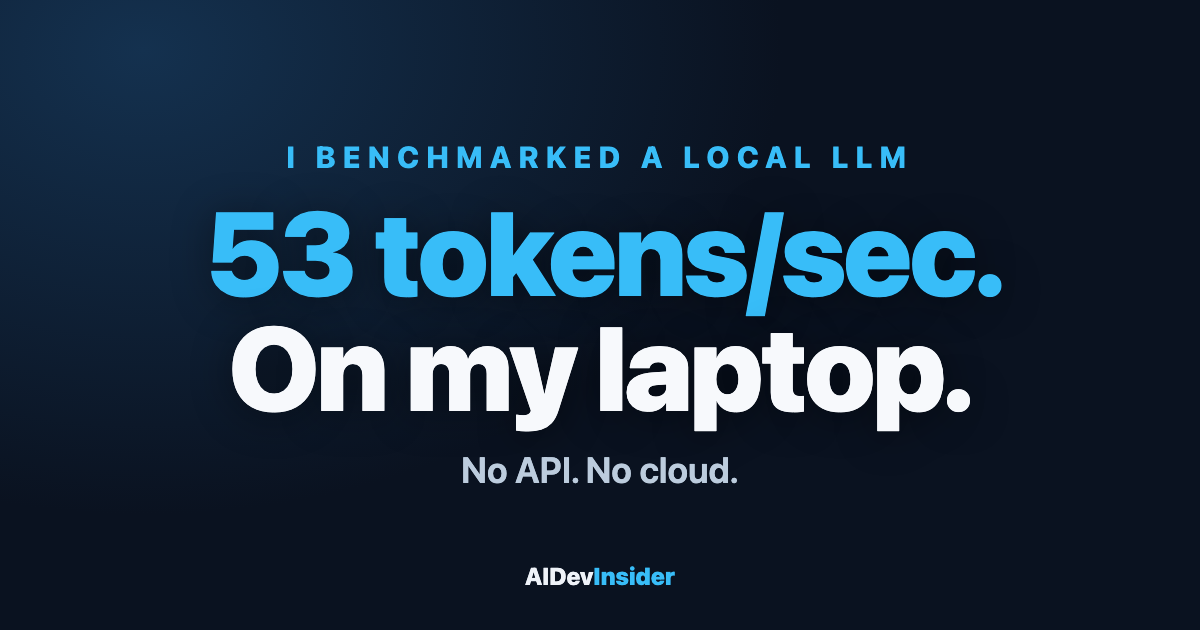
The short version: a 3B model generated text at 51 to 55 tokens per second, used 2.5 GB of memory, and wrote correct, runnable code on the first try. That is faster than you can read, on hardware you already own.
What a local LLM actually is
A local LLM is the same kind of model you use through a chat website, except the weights sit on your disk and the computation happens on your own GPU or CPU. Nothing is sent to a server. You download a file (the model weights), a small runtime loads it into memory, and your prompts are processed on the metal in front of you.
Three numbers define any model you consider:
Parameter count. The “3B” or “7B” in a model name is billions of parameters. More parameters usually means more capability and more memory. For laptops in 2026 the sweet spot is 3B to 8B.
Quantization. Weights are compressed from 16-bit floats down to roughly 4-bit integers via quantization so they fit in consumer memory. A 7B model at 4-bit lands around 4.7 GB on disk instead of 14 GB. The quality loss at 4-bit is small and, for most work, not noticeable.
Context window. How many tokens the model can hold at once. Both models I ran defaulted to a 4096-token window, enough for a long file or a multi-turn chat.
Why run a model on your own machine
There are four honest reasons running one on your own machine earns its place, and one reason people overstate.
Privacy. Your prompts and code never leave the machine. For proprietary code, client data, or anything under an NDA, that is the whole argument by itself.
Cost. After the download, inference is free. No per-token billing, no monthly seat. If you run thousands of small completions a day (classification, formatting, commit messages), a local LLM removes that line item entirely.
Offline and latency. No network means no round trip. On a warm model my short prompts returned in about one second total, and the first token appeared almost immediately.
Control. The model does not change under you. A hosted endpoint can be deprecated or silently updated; a local file is yours and reproducible.
The overstated reason is raw quality. A 3B or 7B model is not GPT-class. It is excellent at focused, well-defined tasks and weaker at long open-ended reasoning. Knowing that line is the difference between a useful tool and a frustrating one.
The fastest way in: Ollama in two commands
I used Ollama, which is the lowest-friction runner on macOS, Linux, and Windows and is open source. On a Mac with Homebrew it was two steps:
brew install ollama
Start the server, then pull and run a model:
ollama run llama3.2:3b
That single command downloaded the model (2.0 GB), loaded it, and dropped me into a chat prompt. Adding --verbose prints the timing stats I used for every measurement here. On Apple silicon, Ollama uses the GPU through Metal automatically, which is why both models reported running “100% GPU” with no configuration from me.
If you prefer a graphical app, LM Studio wraps the same idea with a model browser and a chat UI. The mechanics underneath are identical: download quantized weights, load them, run inference locally.
The numbers I measured on a 16 GB M5
Here is the full head-to-head, same machine and same prompts. The machine was an Apple M5 with 16 GB of unified memory running Ollama 0.35.1.
| Metric | llama3.2:3b | qwen2.5:7b |
|---|---|---|
| Download size | 2.0 GB | 4.7 GB |
| Loaded in memory | 2.5 GB | 4.7 GB |
| Cold load | 0.5 to 1.3 s | 4.8 s |
| Generation speed | 51 to 55 tokens/s | 25 to 26 tokens/s |
| Prompt ingest | 107 to 339 tokens/s | 102 to 160 tokens/s |
| Backend | 100% GPU (Metal) | 100% GPU (Metal) |
A few things stood out while recording these.
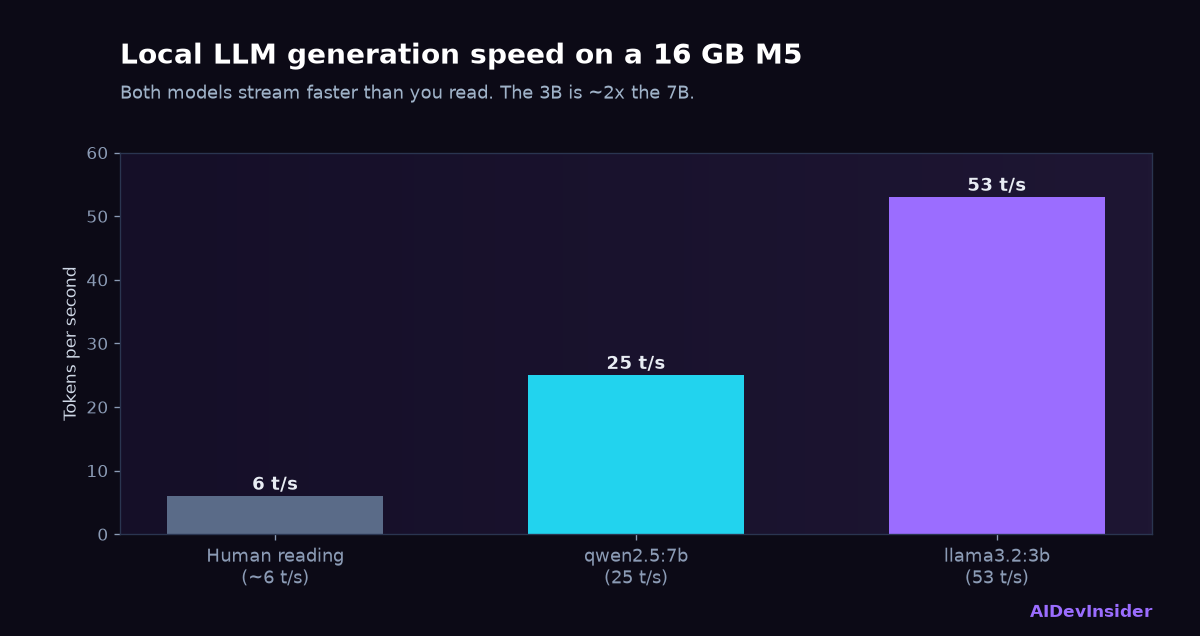
The 3B generation rate was remarkably steady: 52.16, then 51.15, then 51.99 tokens per second across three different prompts, and 55.36 right after a cold load. For reference, a comfortable human reading speed is around 5 to 7 tokens per second, so the model produces text roughly ten times faster than you read it.
Prompt caching is real and helps. On a repeat prompt, Ollama reported 20 tokens served from cache and the ingest rate jumped from 107 to over 300 tokens per second. For chat and iterative work, that keeps responses snappy.
Memory headroom is the quiet win. The 3B used 2.5 GB resident. On a 16 GB machine that leaves the operating system, the browser, and an editor completely unbothered. I never saw memory pressure with the 3B loaded.
3B vs 7B: which one should you run
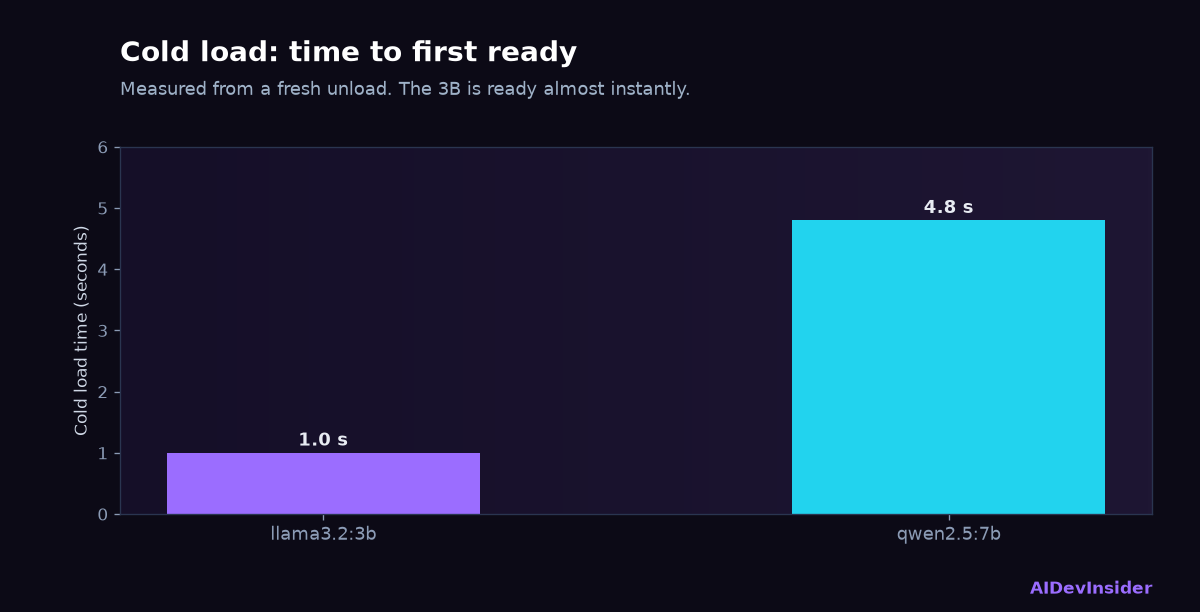
The 7B model is twice the download and runs at half the speed. That is the trade in one line. The 3B generated at 51 to 55 tokens per second; the 7B at 25 to 26. Cold load went from about a second to nearly five.
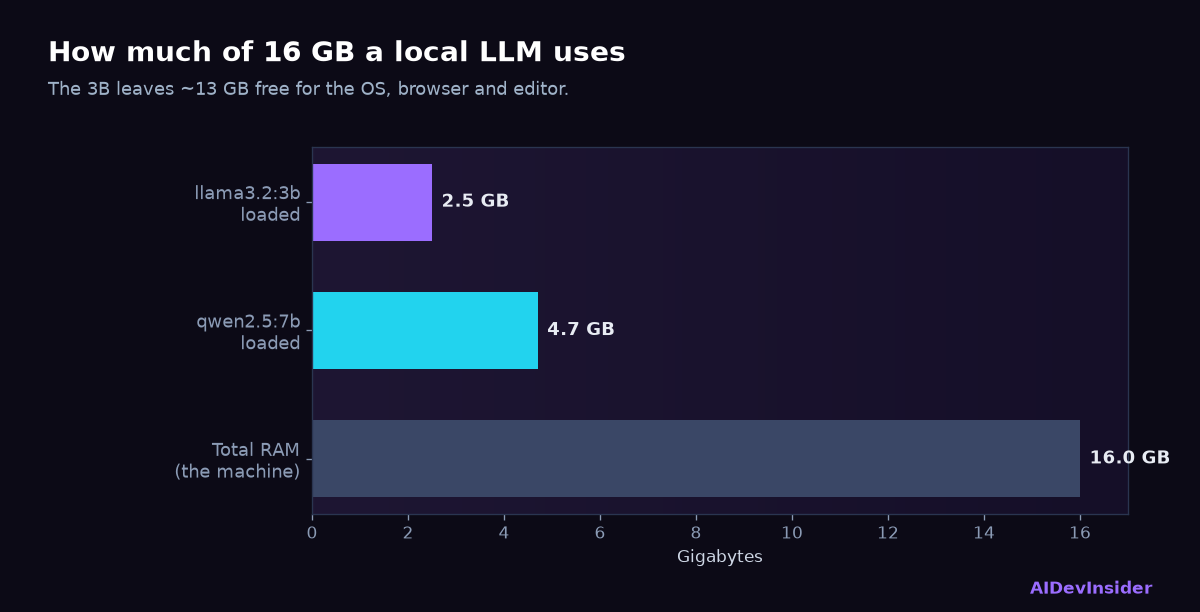
For a 16 GB machine my conclusion is specific: run the 3B as your daily driver. It is fast enough that generation feels instant, it is light enough to leave running all day, and for the kinds of tasks a local LLM is actually good at, the quality gap to the 7B was not visible on my prompts. Reach for the 7B when you want a bit more reasoning headroom on a harder question and can accept the slower stream.
If you have 32 GB or more, the maths shifts and a 7B or even a 13B becomes a comfortable default. But the point of a local LLM is that it runs on the machine you have, and on a mainstream 16 GB laptop the 3B is the one you will keep.
Does the code it writes actually run?
Speed means nothing if the output is wrong, so I gave both models the same real task: write a Python is_palindrome(s) function that ignores case and spaces. Then I actually executed what they produced.
The 3B returned this:
def is_palindrome(s):
s = ''.join(c for c in s if c.isalnum()).lower()
return s == s[::-1]
I ran it against four cases, including “A man a plan a canal Panama” and the empty string. It passed 4 of 4. Note that it used isalnum(), which strips punctuation as well as spaces, so it handles more than I asked for.
The 7B also produced working code, but slightly less robust:
def is_palindrome(s):
s = s.lower().replace(" ", "")
return s == s[::-1]
It only strips spaces and case, not punctuation. It runs cleanly and satisfies the literal request, but on a sentence with commas it would behave differently from the 3B. That is a genuinely useful finding: on this task the smaller model happened to write the more careful solution. Bigger is not automatically better, and the only way to know is to run the output rather than trust the parameter count.
The honest takeaway is that a model like this is reliable for well-known, well-specified coding problems. For those, a 3B on your laptop is a real productivity tool. For novel architecture decisions or long multi-file reasoning, you will still want a frontier model.
What a local LLM is good at, and what it is not
After a few hours with both models, here is where it clearly earns its keep:
Fast, bounded tasks. Rename variables, write a regex, draft a commit message, summarise a file, convert JSON to a dataclass. These return instantly and are correct often enough to save real time.
Private and offline work. Anything you cannot or should not send to a hosted API.
High-volume automation. Classification, tagging, and formatting at scale where per-token API cost would add up.
And where it is still weak:
Long open-ended reasoning. A 3B will lose the thread on a complex multi-step problem faster than a frontier model.
Current facts. The weights are frozen at training time, so the model has no knowledge of anything recent and cannot browse.
Very large context. A 4096-token default window is fine for a file, not for a whole repository.
Observability and evaluation come next
Running a local LLM is step one. The moment you put one behind anything real, two questions appear: is it actually working well, and how do I see what it is doing. Measuring quality systematically is LLM evaluation, and watching latency, tokens, and failures in production is LLM observability. Both matter more for a local model than a hosted one, because there is no vendor dashboard doing it for you. I cover each in its own hands-on guide.
Get the next hands-on breakdown
New developer deep-dives on AI, cloud, security and careers — the stuff I actually test. No fluff, unsubscribe anytime.
FAQ
What hardware do I need to run a local LLM?
A machine with 16 GB of RAM runs a 3B to 7B model comfortably. I measured a 3B using 2.5 GB and a 7B using 4.7 GB on a 16 GB Apple M5, both fully on the GPU. Apple silicon is especially good because its unified memory is shared with the GPU. On Windows or Linux, any recent machine with 16 GB and an integrated or discrete GPU will work.
How fast is a local LLM really?
On my 16 GB M5, a 3B model generated 51 to 55 tokens per second and a 7B generated 25 to 26. For context, that is roughly ten times and five times faster than human reading speed, respectively. Short prompts on a warm model returned in about one second total.
Is a local LLM as good as ChatGPT?
No, and that is the wrong comparison. A 3B or 7B local LLM is excellent at fast, well-defined tasks and private or offline work, but it is weaker at long open-ended reasoning and has no knowledge of recent events. Use a local LLM for bounded, high-volume, or sensitive work, and a frontier model for hard reasoning.
How much disk space does a local LLM use?
A 4-bit quantized 3B model is about 2.0 GB on disk; a 7B is about 4.7 GB. Quantization is what makes this possible, compressing 16-bit weights down to roughly 4-bit with little visible quality loss.
Which model should I start with?
Start with a 3B such as llama3.2:3b. On a 16 GB machine it is the fastest and lightest option, and it handled a real coding task correctly in my testing. Move up to a 7B only when you need more reasoning headroom and can accept half the generation speed.
Does running a local LLM cost anything?
Only the one-time download. After that, inference is free because it runs on your own hardware, with no per-token billing and no subscription. That is a core reason to run one for high-volume tasks.