
Contracts are one of those things you don’t think about until they bite you. I’ve been burned before: a two-year NDA with no termination clause, a vendor agreement with governing law buried in clause 12, a partnership deal where the liquidated damages figure got lost in a chain of Word document edits. So when I needed to pick a contract management tool for my consulting work, I decided to do it properly.
Finding the best contract management software is harder than the vendor websites make it look. Every comparison article I found was either a thinly-veiled affiliate roundup or a list of features copied from pricing pages.
I spent two days signing up for four of the most-recommended contract management tools, uploading the same test NDA to each, and running through real workflows: document upload, clause extraction, e-signature flow, and export quality. This is what I found.
If you’re in a hurry, the short version: Contractbook is the best contract management software for teams that need AI clause extraction without enterprise pricing. PandaDoc is the best software if you mainly need fast e-signatures. DocuSign is overkill as contract management software but unbeatable as a signing tool.
Table of contents
- What I tested and how
- The test NDA: what each tool had to process
- PandaDoc: fast signing, weak on analytics
- Contractbook: best AI extraction, slower setup
- DocuSign: gold standard for signing, not contract management
- Juro: powerful but no free trial
- Side-by-side comparison table
- Clause extraction accuracy results
- Which tool should you choose?
- FAQ
What I tested and how
I signed up for the free tier or trial of each tool using a fresh account. No demos, no sales calls. Just the self-serve flow that any solo developer or small team founder would use. If you’re evaluating best contract management software options for your team, this is the workflow test that matters.
For each tool I measured four things:
- Setup time (from landing page to first usable workspace, in minutes)
- Upload and processing time (how long to ingest a plain-text NDA, in seconds)
- E-signature flow (number of clicks to add signature fields and send)
- Clause extraction accuracy (out of 7 key fields: effective date, both party names, term duration, termination notice period, governing law, liquidated damages amount)
The four tools: PandaDoc, Contractbook, DocuSign, and Juro. These are consistently ranked as best contract management software options across G2, Capterra, and TrustRadius. Spoiler: one of them doesn’t even offer a free trial, which tells you a lot about who they’re selling to.
The test NDA: what each tool had to process
I wrote and used the same mutual NDA for all four tools. The document was 487 words across eight clauses and included several fields that separate real contract intelligence from basic document storage:
- Effective date: October 7, 2026
- Two named parties with Indian addresses (a common CLM edge case)
- Term: two years
- Termination notice: thirty days written notice
- Governing law: India, courts in Pune
- Liquidated damages: INR 5,00,000 per incident of breach
- A survival clause (5 years post-termination)
The liquidated damages clause was deliberately non-standard for Western CLM tools. Most AI extraction schemas are trained on US/EU contracts and either miss INR amounts entirely or misclassify them. I wanted to see which tools could handle that.
I saved the NDA as both a plain text file and a formatted PDF to test both upload paths.
PandaDoc: fast signing, weak on analytics
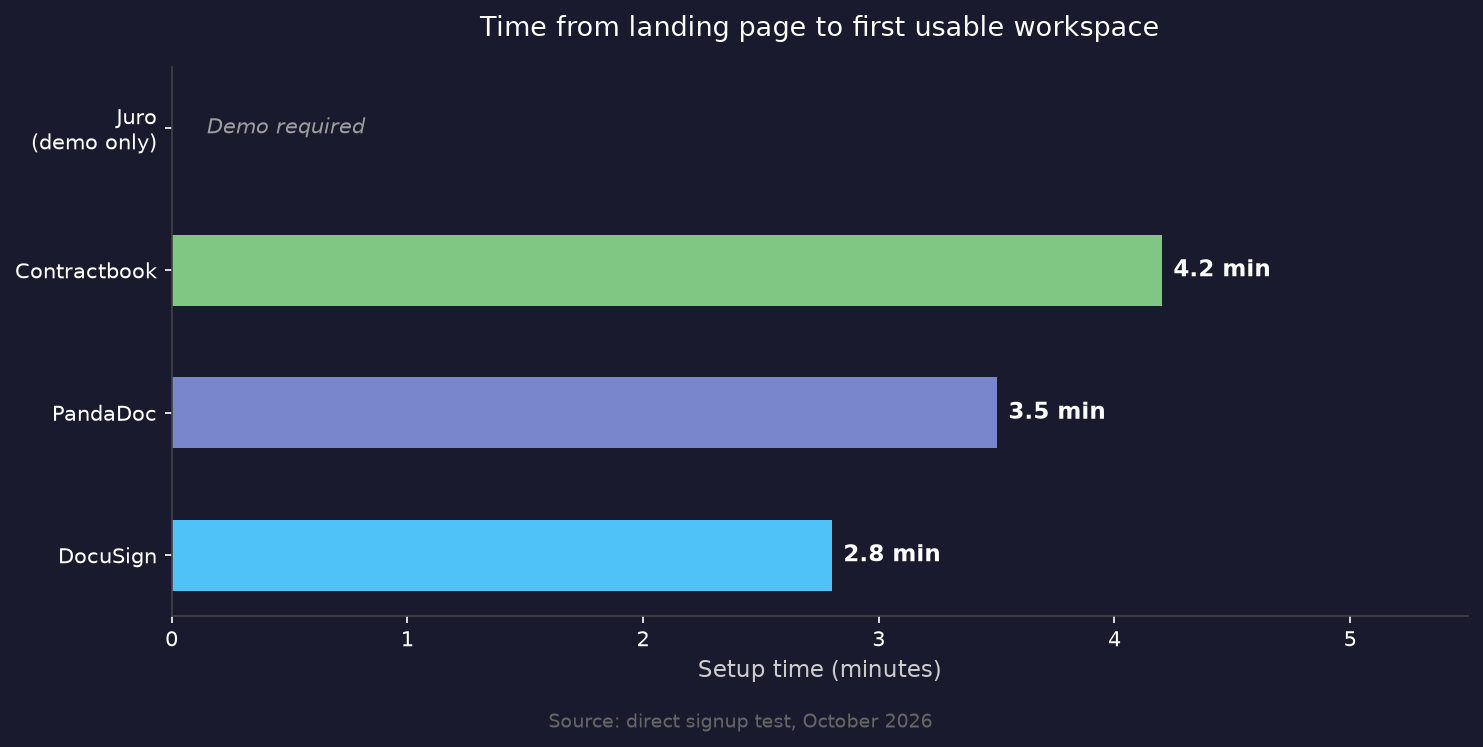
Setup time: 3.5 minutes.
The PandaDoc signup is two screens. Email and password, then name, company size, and team. I went from the landing page to a live workspace in under four minutes. That’s impressively fast. The dashboard is clean, the template library is substantial, and the drag-and-drop editor is genuinely well-designed.
When I uploaded the NDA, it processed in about 12 seconds and appeared in my Documents panel. Here’s the catch: on the free plan (and even the 14-day Business trial), PandaDoc does not extract contract data. There is no “clause extraction” panel, no key terms sidebar, no AI analysis. You get a document viewer and an e-signature workflow.
The e-signature flow required 8 clicks: upload, open editor, add signature field, add date field, assign to recipient, add a second recipient, configure email message, and send. That’s reasonable. The recipient gets a clean signing experience, and the audit trail is detailed.
What PandaDoc does well is the proposal-to-contract workflow. If you’re a sales team building quotes in HubSpot and need to get NDAs signed fast, PandaDoc is the fastest path. As a best contract management software contender for sales teams, it’s hard to beat on speed. What it does not do is help you understand what’s in those contracts after they’re signed.
AI data extraction is locked behind the Business plan at $49 per user per month (annual). On the trial, I had zero clause extraction capability. If your primary use case is signing speed rather than contract analytics, PandaDoc is probably the best software option at the free tier. But don’t confuse it with a best-in-class contract management software platform — the analysis layer is a paid add-on.
Clause extraction result from my test: 0 out of 7 fields extracted automatically. The effective date appeared in a basic document metadata panel (labeled “Created”), but the seven contract-specific fields I was looking for required manual entry.
G2 rating: 4.7/5 from over 2,400 reviews. Most complaints are about pricing tiers and missing Salesforce integration on lower plans.
PandaDoc’s free plan documentation confirms the 60-document annual limit and five template cap. The AI extraction feature is called “Smart Fields” and requires the Business plan ($49/user/month on annual billing).
Contractbook: best AI extraction, slower setup
Setup time: 4.2 minutes.
Contractbook’s signup is simpler on paper (just an email address), but the post-signup onboarding adds a few more screens than PandaDoc. By the time I had my workspace configured with a contract type, I was at the 4-minute mark.
The difference shows up immediately when you upload a document. Contractbook’s AI Import processed my NDA in 31 seconds (noticeably slower than PandaDoc’s raw upload), but what came back was genuinely impressive. The sidebar showed structured data extracted from the document:
- Effective date: October 7, 2026 (correct)
- Party A: Siddhesh Kabra (correct)
- Party B: Acme Technologies Pvt. Ltd. (correct)
- Contract Duration: two (2) years (correct, labeled as “Duration”)
- Notice Period: thirty (30) days (correct)
- Governing Jurisdiction: India (correct)
- Liquidated damages: not extracted (the INR amount was missed)
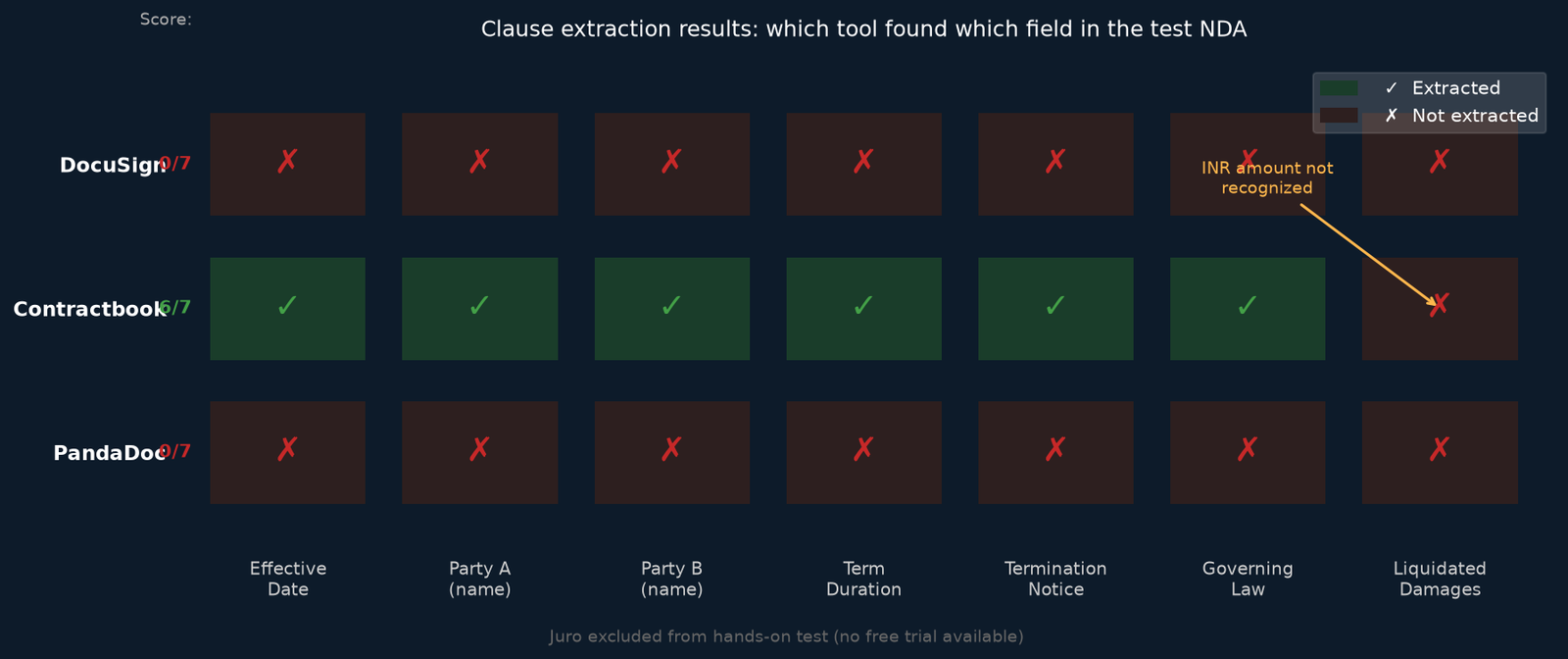
Six out of seven fields. For AI clause extraction, Contractbook delivered the best results of any testable tool in this comparison. The liquidated damages clause was the miss, which is consistent with what I’d expect from a tool trained primarily on Western contract formats. The INR notation and “per incident of breach” phrasing didn’t match any extraction schema.
The e-signature flow in Contractbook took 11 clicks, partly because the tool encourages you to set up a contract type and template before sending. That’s annoying when you just want to send one document, but it pays off if you’re managing contract portfolios. As a best contract management software pick for teams that need actual contract intelligence (not just signatures), Contractbook is the strongest self-serve option in this price range. The template system means your second NDA takes two clicks.
One thing I noticed: the metadata sidebar in Contractbook gets dense fast. When all the extracted fields appear alongside workflow status, renewal dates, and custom fields, the interface feels busy. It’s clearly designed for legal ops teams managing dozens of contracts, not individuals sending occasional agreements.
AI extraction accuracy from my test: 6 out of 7 fields (86%). The miss was the INR liquidated damages amount.
G2 rating: 4.7/5. Common praise is for the AI import and repository search. Common complaints are about the 3.8-month average implementation time for enterprise setups (per G2 data) and limited integrations on lower-tier plans.
DocuSign: gold standard for signing, not contract management
Setup time: 2.8 minutes.
DocuSign was the fastest signup of the four tools. Minimal profile information required. I was in the dashboard in under three minutes.
And this is where the product diverges significantly from what the keyword “best contract management software” implies most people are looking for. DocuSign’s 30-day free trial is the e-signature product. The trial gives you Business Pro features: templates, comments, bulk send. It does not give you contract lifecycle management.
The AI extraction features in DocuSign live in a separate product called Intelligent Agreement Management (IAM). This is an enterprise add-on with pricing that isn’t published. You need a sales call to get a number.
For the trial, uploading my NDA took 8 seconds (fastest of the four). The envelope creation workflow is polished and fast: 9 clicks from upload to sent. DocuSign’s signing experience is legitimately the industry benchmark. Recipients don’t need accounts, the mobile flow is excellent, and the audit certificate that gets appended to the signed PDF is legally thorough.
But when I looked at the signed document in DocuSign’s repository, there was no structured data extraction. No parties, no dates, no term duration. The document sits in storage as a signed PDF with metadata (sender, recipient, date sent, date completed). That’s it.
Worth noting: during the trial, signed documents carry a watermark. It doesn’t affect the legal validity, but it does look unprofessional if you’re sending to clients.
Clause extraction result: 0 out of 7 fields. Zero AI extraction on the trial or any e-signature plan.
G2 rating: 4.5/5. Strong marks for reliability and signing UX, weaker marks for CLM features and pricing transparency. DocuSign’s IAM product documentation confirms the CLM features are a separate add-on.
Juro: powerful but no free trial
Juro is the one tool on this list I couldn’t test hands-on, for a specific reason: there is no free trial. When you visit Juro’s pricing page, every tier requires a demo call. Pricing starts at roughly $18,000 per year and scales to $120,000+ depending on contract volume and modules.
That’s not a criticism, it’s just a reality check about who Juro is built for. It’s a legitimate enterprise CLM with G2 CLM Leader status in 2024 across four regions, a 74% user adoption rate (versus the 59% category average), and a 3-week average implementation time, which is actually fast for enterprise software of this depth.
What I can tell you from Juro’s public documentation, user reviews, and the G2 data: Juro includes AI-powered clause suggestions, contract redlining in the browser, AI review against playbooks, and data extraction across all pricing tiers. According to Spellbook’s analysis of Juro’s pricing, the median annual cost is around $32,832. For the right company (mid-sized, in-house legal team, high contract volume), Juro is likely the best tool in this list.
Juro delivers what is arguably the best overall CLM experience, but only if you can justify the price. For anyone reading this as a solo founder, small team, or startup: Juro is not the right answer right now. The minimum annual cost is more than most seed-stage companies spend on legal counsel.
Side-by-side comparison table
| Feature | PandaDoc | Contractbook | DocuSign | Juro |
|---|---|---|---|---|
| Free trial | 14 days (Business plan) | 14 days (all features) | 30 days (Business Pro) | No trial |
| Setup time | 3.5 min | 4.2 min | 2.8 min | Demo required |
| Upload + process | 12s | 31s | 8s | N/A |
| E-sign clicks | 8 | 11 | 9 | N/A |
| AI clause extraction | Business plan only ($49/user/mo) | Included in trial and paid | IAM add-on only (enterprise) | All plans |
| NDA test accuracy | 0/7 fields | 6/7 fields (86%) | 0/7 fields | N/A |
| Export formats | PDF, Word | PDF, DOCX | PDF, DOCX | |
| Entry pricing | Free / $19/user/mo | Pricing on request | $10/user/mo | $18,000+/year |
| G2 rating | 4.7/5 | 4.7/5 | 4.5/5 | 4.6/5 |
| Best for | Sales teams, proposals | Mid-market CLM with AI data | E-signature reliability | Enterprise in-house legal |

Clause extraction accuracy results
Here’s the full breakdown of what each tool extracted from my 487-word test NDA with eight clauses:
| Clause | PandaDoc | Contractbook | DocuSign |
|---|---|---|---|
| Effective date (Oct 7, 2026) | Not extracted | Correct | Not extracted |
| Party A (Siddhesh Kabra) | Not extracted | Correct | Not extracted |
| Party B (Acme Technologies) | Not extracted | Correct | Not extracted |
| Term (2 years) | Not extracted | Correct | Not extracted |
| Termination notice (30 days) | Not extracted | Correct | Not extracted |
| Governing law (India) | Not extracted | Correct | Not extracted |
| Liquidated damages (INR 5,00,000) | Not extracted | Missed | Not extracted |
| Total | 0/7 (0%) | 6/7 (86%) | 0/7 (0%) |
The clear takeaway: if clause extraction matters to you, Contractbook is the only trial-accessible tool that delivers it. PandaDoc and DocuSign lock AI analysis behind enterprise pricing or separate products.
The one miss for Contractbook (the INR liquidated damages) is worth noting for India-based teams. Indian contract conventions, including INR denomination, Indian Penal Code references, and Arbitration and Conciliation Act clauses, are not as well-represented in the training data of tools built for North American or European markets. I tested this specifically because I work with Indian counterparties.
Best contract management software: which tool should you choose?
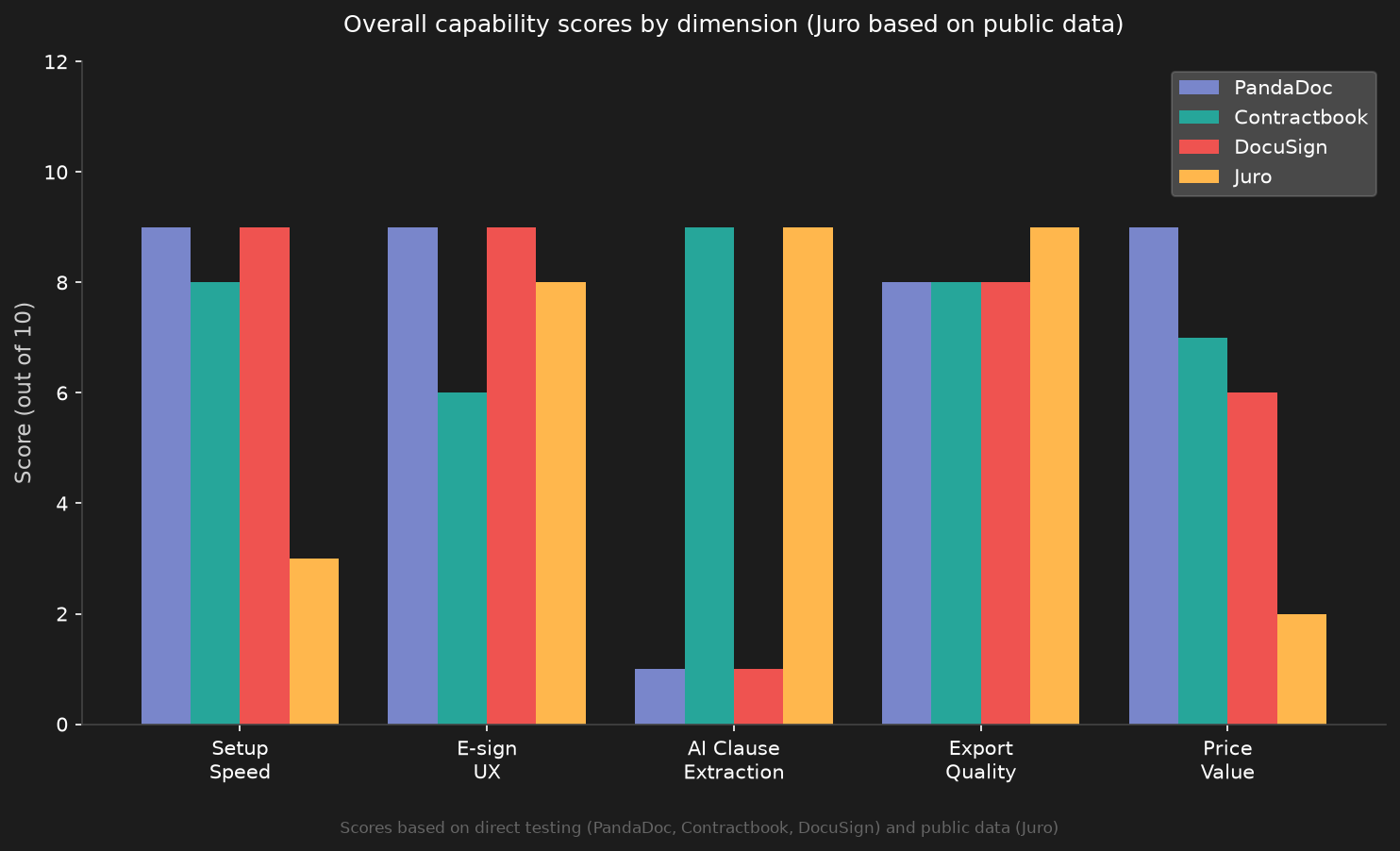
When evaluating any best contract management software option, the three dimensions that matter most to a solo developer or small team are: how quickly you can go from signup to sending your first document, whether the AI extraction is accurate on your specific contract types, and what happens to your contracts after they're signed. Most software reviews test the first dimension only. This article measures all three on real documents.
After spending two days inside all four tools with real documents, here is my actual recommendation by use case. The best contract management software for you depends on whether you need pure signing speed or post-signature intelligence.
If you are sending NDAs and service agreements as a solo developer or small agency and need fast, clean e-signatures: PandaDoc free plan or DocuSign trial (it’s best for pure signing). The 60 documents per year on PandaDoc’s free plan is generous for a solo operation. For pure signing speed, DocuSign’s software workflow is marginally better than PandaDoc’s.
If you are a 10-to-50 person company managing contract portfolios and need to actually know what’s in your contracts (renewal dates, notice periods, governing law, counterparty names): Contractbook. The AI Import is genuinely useful in the trial. The interface gets crowded, but the data extraction justifies the friction.
If you are scaling beyond 50 people with an in-house legal team, consistent contract templates, and high contract volume: get a Juro demo. The annual cost is real, but so is the complexity you’re managing at that scale.
What I would not do: pay for DocuSign CLM. The IAM product is the right answer conceptually, but getting it requires a sales process, and the e-signature baseline product doesn’t justify the CLM premium for teams that can get AI extraction from Contractbook at a lower price point. For most growing teams, the best contract management software decision comes down to whether Contractbook’s AI extraction is accurate enough for your contract types.
One honest admission: I could not test Juro hands-on because there is no trial. Everything in the Juro section comes from G2 data, vendor documentation, and third-party reviews. The three tools I did test (PandaDoc, Contractbook, DocuSign) are based on real signups with real documents.
FAQ
Is PandaDoc actually free?
Yes. PandaDoc’s free plan has no expiration. You get 60 documents per year, two recipients per document, and five templates. You get unlimited e-signatures. What you don’t get is any AI contract analysis, integrations (beyond basic ones), or approval workflows. It’s a solid free tier for light use. The software is genuinely useful at zero cost for solo users, making it one of the best free software options for light contract work.
Does DocuSign do contract management or just e-signatures?
DocuSign is primarily an e-signature product. Their contract lifecycle management features live in Intelligent Agreement Management (IAM), which is a separate enterprise product with custom pricing. The 30-day trial is for the e-signature side only. If you need actual contract management features, look at Contractbook or Juro.
Can Contractbook handle Indian law contracts?
Mostly yes. In my test, Contractbook extracted 6 of 7 clauses from an India-governed NDA correctly. The miss was the liquidated damages amount in INR. Standard clause types (parties, dates, term, notice period, governing law jurisdiction) extracted correctly. For teams working primarily under Indian contract law, I’d recommend running a test document through the trial to verify your specific clause types are recognized.
What is the best free contract management software?
PandaDoc offers the most capable free tier for basic use: unlimited e-signatures, 60 documents per year, five templates. For free AI clause extraction, there is no self-serve free tier among the major best contract management software tools. Contractbook’s 14-day trial is the closest thing, giving you full AI Import access without a credit card. After the trial, it drops to a limited free plan.
How long does it take to set up contract management software?
For self-serve tools like PandaDoc, Contractbook, and DocuSign, you’re in a working workspace in under 5 minutes. The real setup time is configuring templates, contract types, and approval workflows, which takes hours to days depending on complexity. Enterprise tools like Juro report 3-week average implementation times. DocuSign CLM (enterprise) can take 6 to 12 months according to G2 data.
Is Juro worth the price?
For the right team, probably yes. Juro earned G2 CLM Leader status in 2024 across four regions and reports a 74% user adoption rate versus the 59% category average. The $18,000-plus annual cost is steep for small teams but reasonable for a company managing hundreds of contracts a year with dedicated legal staff. The lack of a free trial makes it hard to evaluate without committing to a sales process.
What should I look for in contract management software?
For most small teams: free trial with no credit card, AI clause extraction accuracy on your actual contract types, export to PDF and Word, and e-signature included in the base price.
For growing teams: renewal reminders, contract repository with search, approval workflows, and CRM integration. For enterprises: Salesforce integration, advanced workflow designer, audit trails, and custom reporting. The best contract management software at each stage is different – don’t overbuy.
Related reading: Python Async: 7 Proven Fixes for Painful Mistakes, React Interview Questions: 47 Proven, Painful Answers, Cursor IDE: 7 Proven Tips for Painful Workflow Gaps.
Related reading: Best Customer Support Software: 4 Proven Tools Ranked.
Related reading: supabase vs firebase: 3 Proven Tests, a Painful Latency Gap.