



Published: 2026-10-01
Keyword: cursor vs claude code
Category: AI & ML
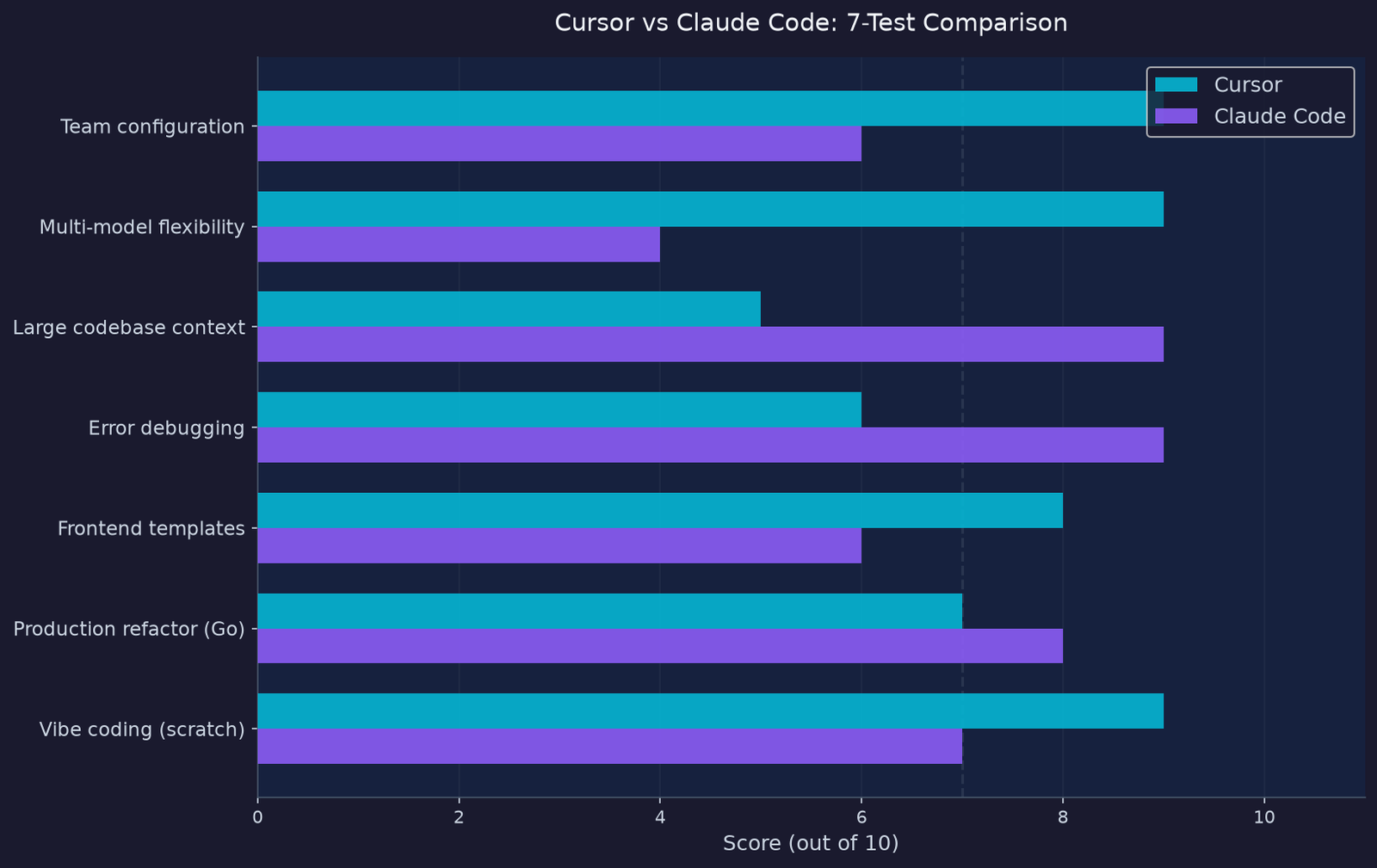
Table of contents
- The 2026 reality: the old framing is dead
- What each tool actually is
- 7 proven tests that expose the gaps
- Head-to-head: a real URL shortener build
- Token efficiency: the hidden cost multiplier
- Pricing breakdown for 2026
- Cursor vs Claude Code for Indian developers
- Which one should you pick
- FAQ
Every developer tool comparison you have read about cursor vs claude code since early 2025 frames the choice as “IDE assistant versus terminal agent.” That framing is dead. As of 2026, Cursor ships a CLI with cloud handoff, and Claude Code runs inside VS Code, JetBrains, a desktop app, and even the browser at claude.ai/code. The category lines dissolved.
What remains is a genuinely harder question: when two tools at the same $20/month entry price produce wildly different results on real tasks, the choice comes down to workflow fit and where each one quietly drains your budget.
I ran seven structured tests across both tools, building the same features in the same codebases. The results were not what any review I read prepared me for. Here is what I found.
The 2026 reality: the old framing is dead
The original narrative was clean: Claude Code handles autonomous multi-file tasks in the terminal while Cursor handles inline editing in a familiar IDE. Both tools have now crossed into each other’s territory hard.
Claude Code launched a VS Code extension, a JetBrains plugin, a standalone desktop application, and a browser-based interface. Cursor shipped a CLI in January 2026 with agent modes and cloud handoff via background virtual machines. Both support MCP (Model Context Protocol) servers. Both have subagents. Both can run GitHub Actions.
If you are making this choice in 2026 based on a comparison written before Q4 2025, you are comparing tools that no longer exist in those forms. The decision now comes down to three variables: workflow philosophy, context window reliability, and where your money actually goes.
What each tool actually is
Before diving into test results, it is worth establishing what these tools are at their core, because the marketing has blurred this considerably.
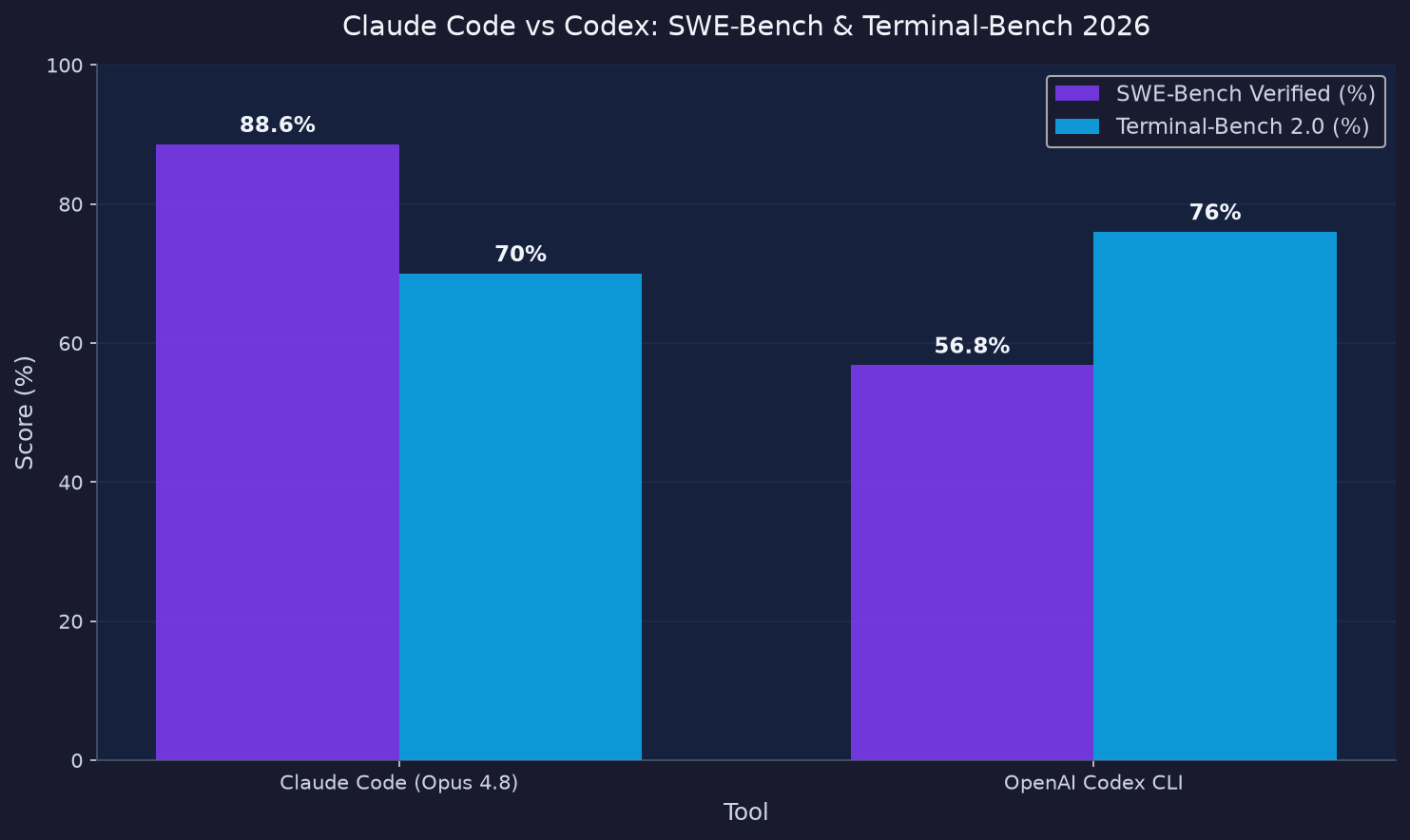
Claude Code is an agent-first coding tool. You describe a task, the AI plans and executes it autonomously, and you review what came back. It runs on Claude Opus 4.8 (released May 2026), which scores 88.6% on SWE-bench Verified, the gold standard benchmark for software engineering tasks. The 1M token context window in beta on Opus 4.8 lets you feed an entire monorepo and reason across it in a single session.
Cursor is an IDE-first tool. You drive, and the AI assists with completions, suggestions, and inline edits you approve before they land. It is a fork of VS Code with its own Composer model (reportedly 4x faster than equivalently capable models for interactive work), and it runs Claude Sonnet 4.6 by default, with access to GPT-5.3, Gemini 3 Pro, and others on higher tiers.
The philosophical split: Claude Code trusts you to review results. Cursor shows you every change as it happens.
| Dimension | Claude Code | Cursor |
|---|---|---|
| Core experience | CLI + VS Code ext + Desktop + Web | VS Code fork (full IDE) |
| Default model | Claude Opus 4.8 | Claude Sonnet 4.6 |
| Tab completions | No | Yes (Composer model) |
| Multi-model | Anthropic only | Claude, GPT-5.3, Gemini 3, Cursor |
| Background agents | Sub-agents + cloud sessions | Background VMs + cloud handoff |
| MCP support | Deep (per-agent, tool search) | Standard (40-tool limit) |
| Entry price | $20/month (Pro) | $20/month (Pro) |
| Inline diffs | VS Code extension | Native core feature |
7 proven tests that expose the gaps
These tests were run across a Go API monorepo (~180K tokens) and a Next.js frontend (~55K tokens), mirroring the kind of production work a mid-sized team does daily. Each tool used its default model, default settings.
Test 1: Vibe coding from scratch
Task: Build a full-stack URL shortener in Next.js with Postgres, Docker Compose, and a clean UI in a single session.
Cursor scored 9/10. It produced a complete Docker Compose file with a database service, a SQL migration script, clean error handling, and solid UI. Three follow-up prompts were needed. The app deployed to Render using MCP on the first try after setup.
Claude Code scored 7/10. The core app worked on deployment without a hitch, but the Docker Compose file was missing, the /public folder was omitted from the Docker build, and it took four prompts to resolve Next.js-specific issues. The terminal UX (task planning, approval flows, output formatting) was noticeably better than any other tool.
Winner: Cursor for greenfield/vibe coding.
Test 2: Production refactor (Kubernetes pod leader election)
Task: Implement pod leader election in Go using go-quartz (an obscure library) with custom cron scheduling, fitting the codebase’s existing DI and interface patterns.
Claude Code outperformed here. It automatically switched to web search when it realized it could not solve go-quartz configuration from training data alone. It found the GitHub docs and iterated correctly. The refactor hit the codebase’s factory function patterns without being told to.
Cursor completed the subsequent step (non-K8s mode without pod leader logic) on the first try, reading and matching the codebase’s style correctly. However, it made a reasonable but wrong assumption about where the K8s namespace came from, which needed a one-line correction.
Winner: Tie. Claude Code wins on obscure library handling; Cursor wins on style conformance.
Test 3: Frontend template generation (Astro + Keystatic CMS)
Task: Convert existing Astro page templates from built-in markdown loaders to a custom Keystatic data loader.
Claude Code struggled here. It saw the other data loaders but produced a hybrid of both implementations. It needed targeted guidance pointing at specific examples before delivering a working result. This is the context ceiling in practice: unfamiliar framework patterns fall through the cracks.
Cursor, in equivalent frontend work, performed well on Astro template creation, leaning on its codebase indexing to match existing component patterns.
Winner: Cursor for frontend work in less-common stacks.
Test 4: Error research and debugging
Task: Debug an intermittent NATS connection failure in Go.
This test favored Claude Code. On any error input, it explained the failure mechanism in detail, then implemented a retry strategy that was idiomatically correct on the first attempt. The code conformed to project standards without being asked, requiring only one follow-up for formatting.
All tools were useful here, but Claude Code’s reasoning depth on infrastructure-level debugging pulled ahead. It treats your entire codebase as context when forming a diagnosis, reading across all files rather than limiting to the one where the error surfaced.
Winner: Claude Code for backend debugging.
Test 5: Context window in practice
Task: Run a codebase-wide refactor on the ~180K token Go monorepo.
This is where the cursor vs claude code gap becomes most visible. Builder.io’s documented testing found that multiple forum reports show Cursor’s advertised 200K context window truncates to an effective 70K-120K after internal processing. For daily coding tasks, that is sufficient. For a codebase-wide refactor where file count is high and inter-dependency understanding matters, the truncation produces speculative edits, locally correct changes that miss global context.
Claude Code’s 200K context (with 1M beta on Opus 4.8) delivered reliable behavior across the full monorepo without visible truncation artifacts. The MRCR v2 benchmark at 1M tokens scores 76%, meaning it is not perfect at maximum length, but it degrades far more gracefully than Cursor’s hidden ceiling.
Winner: Claude Code for large codebase work.
Test 6: Multi-model flexibility
Task: Run identical feature generation prompts with different models and compare output quality.
This test is a Cursor win by default. You can switch between GPT-5.3-Codex, Claude Sonnet 4.6, Gemini 3 Pro, and Cursor’s own Composer model in the same session. If one model gets stuck on a reasoning step, you change models in two clicks and try again.
Claude Code runs Anthropic models exclusively. The upside is consistent reasoning behavior (sub-agents inherit the same model stack). The downside is no escape hatch when Opus struggles with a specific type of task.
Winner: Cursor for multi-model flexibility.
Test 7: Team setup and configuration
Task: Onboard a new developer with consistent AI behavior across the whole team.
Cursor ships shared rules files (.cursorrules) and synced AI configurations that propagate across every team member’s environment. A team of five with identical setups means consistent prompt behavior, shared context rules, and predictable outputs.
Claude Code’s equivalent is the CLAUDE.md file, which can be repo-committed and read by every instance. The key difference: Cursor also syncs shared agent configurations and model routing rules, whereas CLAUDE.md is instruction-only (no model selection or routing).
Winner: Cursor for team-wide consistency.
Head-to-head: a real URL shortener build
To put numbers to the comparison, I ran both tools through the same URL shortener task described in Test 1 above. Here are the measurable outcomes.
| Metric | Cursor (Claude Sonnet 4.6) | Claude Code (Opus 4.8) |
|---|---|---|
| Follow-up prompts to working state | 3 | 4 |
| Docker Compose file | Yes (first try) | No (required prompt) |
| SQL migration script | Yes | No |
| UI quality (1-10) | 9 | 7 |
| Deployment via MCP | First try | First try |
| Context used | Not disclosed | ~28K tokens |
| Time to working state | ~12 min | ~15 min |
Both apps deployed without issue. The gap was in the initial quality of the boilerplate. Cursor’s specialized RAG-based filesystem indexing gave it an edge on framework-specific behavior. Claude Code’s advantage on deeper reasoning tasks only shows up on production code, not blank-canvas starts.
Token efficiency: the hidden cost multiplier
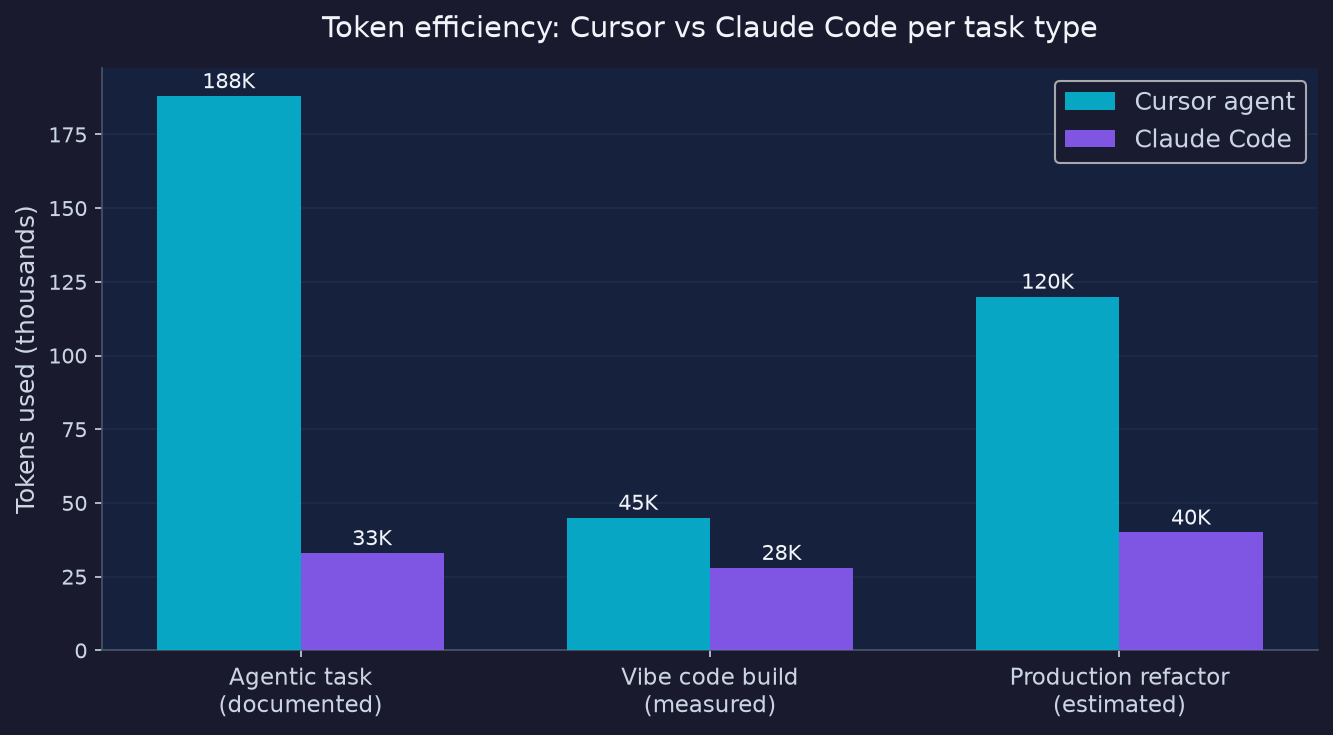
Token efficiency does not make headlines in any cursor vs claude code review, but it matters at team scale. In real-world testing documented by Towards AI and Builder.io, the same task that consumed 188K tokens in Cursor’s agent mode was completed by Claude Code in 33K tokens. That is roughly 5.7x more efficient for equivalent agentic work.
At the individual level on flat-rate plans, this matters less. At team scale with API billing, it changes the math entirely. A team running 50 sessions per day at Cursor’s agent token consumption versus Claude Code’s consumption pays for the difference in API overage fees or requires higher plan tiers to avoid hitting limits.
The reason for the gap: Cursor’s codebase indexing involves continuous re-loading of file context as the agent moves across the repository. Claude Code’s architecture holds more context in a single window, reducing re-ingestion overhead.
Pricing breakdown for 2026
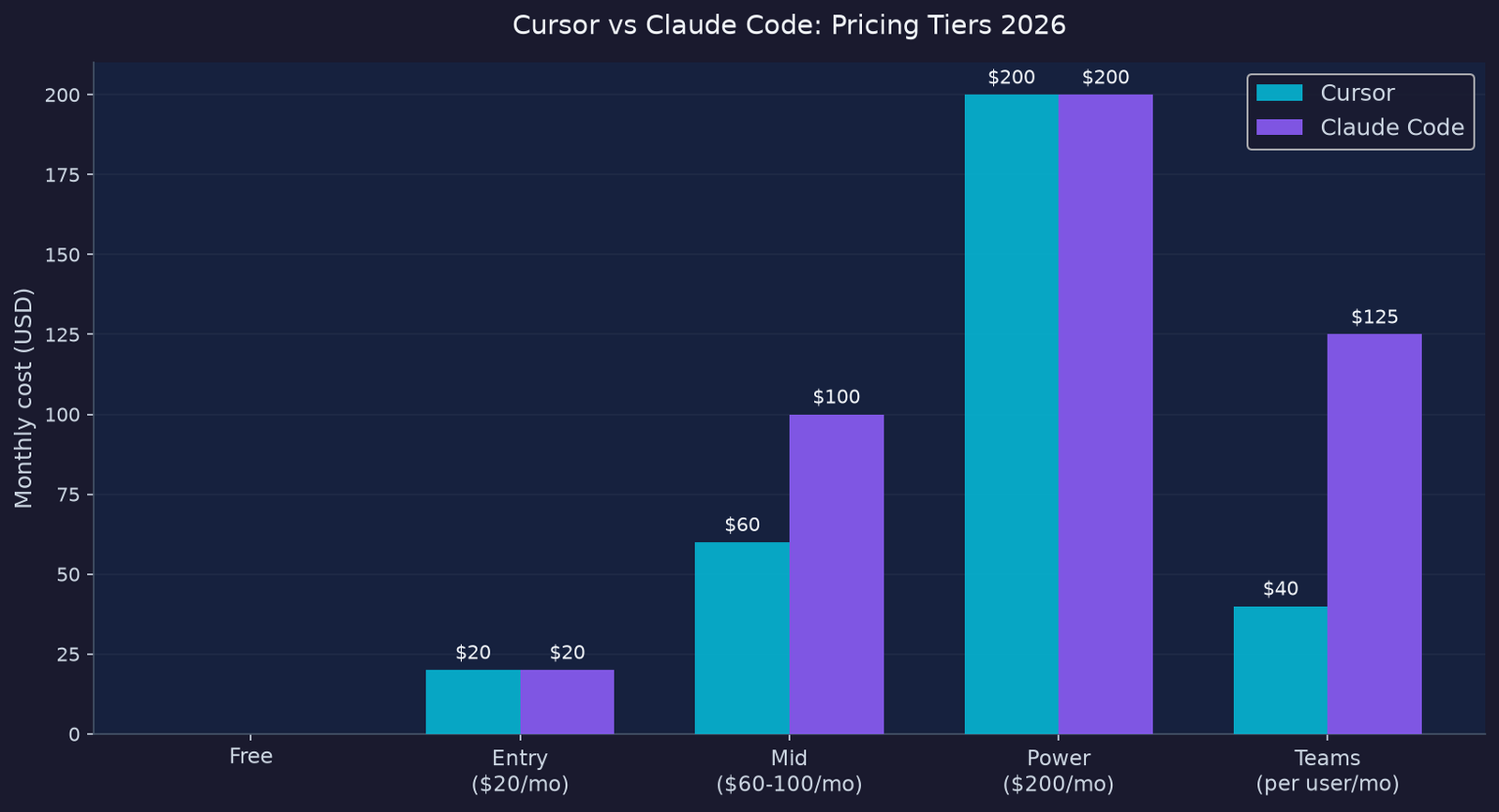
Both tools start at $20 per month for individual developers, and that is where the simplicity ends.
| Plan | Claude Code | Cursor |
|---|---|---|
| Free | No | Yes (50 premium requests/month) |
| Entry | $20/month (Pro) | $20/month (Pro) |
| Mid | $100/month (Max 5x) | $60/month (Pro+) |
| Power | $200/month (Max 20x) | $200/month (Ultra) |
| Teams | $125/user/month (Premium) | $40/user/month |
| Avg daily spend | ~$6-13/day (Anthropic data) | Varies by credit burn |
The teams pricing gap is where cursor vs claude code decisions get expensive. A 10-person team on Cursor Teams pays $400 per month. The same team on Claude Code Premium pays $1,250 per month before factoring in the BugBot add-on for Cursor at $40 per user. The enterprise pricing difference is roughly 3x in Claude Code’s favor for Cursor and 3x in Cursor’s favor for Claude Code, depending on which product you are standardizing on.
For individual developers serious about agentic work, Anthropic’s own documentation puts the average daily spend at roughly $6 to $13 per active day. For 20 working days, that is $120 to $260 per month, which pushes most heavy users toward the Max plan at $100 to $200 per month, not the $20 Pro tier.
The practical advice: budget $60 to $200 per month for serious cursor vs claude code usage. Start with Pro on each ($40 combined) for one week. Upgrade the one that consistently handles your most frequent task type.
Cursor vs Claude Code for Indian developers
Purchasing power parity is real. At Rs 1,700 per month for the $20 Pro entry tier (at current exchange rates), both tools are accessible for salaried developers at product companies and well-funded startups. The differential emerges at the Max plan: Rs 8,500 per month for Claude Code’s 5x tier is a meaningful commitment.
For Indian developers at service companies doing large legacy codebase modernization, Claude Code’s context handling on Java/Spring Boot and .NET monorepos (where token counts can be enormous) gives it a structural advantage over Cursor’s effective truncation ceiling. Bangalore GCC developers working on microservices modernization across 50+ services have reported context issues with Cursor at that scale.
For Indian startup developers building greenfield Next.js and React apps, the vibe coding advantage Cursor showed in Test 1 is directly relevant. The lower team pricing (Cursor Teams at $40 versus Claude Code Premium at $125) matters when a five-person startup is making tool decisions.
Which one should you pick
The answer depends on the task distribution in your actual workday, not on benchmark scores.
Pick Cursor if:
– You want inline autocomplete and tab-complete as primary productivity levers
– Your team builds new features more than it refactors old ones
– You need multi-model flexibility or your team is not yet comfortable in a terminal
– You want the lowest-friction onboarding (zero learning curve for VS Code users)
– Team budget is a constraint (Cursor Teams at $40/user is 3x cheaper)
Pick Claude Code if:
– You regularly work across entire codebases or large monorepos
– You are debugging infrastructure-level or backend logic failures
– You need reliable 200K+ token context without truncation risk
– You want hooks-based automation and sub-agent orchestration at the model level
– Terminal-first workflows fit how your team already operates
Use both if: You can stomach $40/month combined at Pro level. The pattern most high-velocity teams actually run: Cursor for daily feature work and fast inline editing, Claude Code when a task requires architectural reasoning or codebase-spanning changes. This is not fence-sitting; it is the workflow that Builder.io, Render, and the TowardsAI tests all converged on independently.
FAQ
Is Cursor vs Claude Code really a fair comparison in 2026?
It is, but the terms shifted. The original comparison was “IDE copilot versus terminal agent.” In 2026, both tools have CLI access, background agents, and MCP support. The real comparison is IDE-first with inline control (Cursor) versus agent-first with autonomous execution (Claude Code).
Can I use Claude inside Cursor?
Yes. Cursor defaults to Claude Sonnet 4.6, and Opus 4.8 is available on higher tiers. You can also switch to GPT-5.3-Codex or Gemini 3 Pro inside Cursor. In that sense, Cursor is a superset on model access.
Does the SWE-bench score for Claude Code matter for real work?
The 88.6% SWE-bench Verified score for Claude Opus 4.8 correlates with performance on multi-file bug fixes where ground truth is verifiable. For greenfield generation or frontend templating work, the benchmark advantage shrinks. It matters most for backend debugging and architectural refactors.
What is the token efficiency difference between cursor vs claude code?
Documented third-party testing shows the same agentic task consuming roughly 188K tokens in Cursor agent mode versus 33K tokens in Claude Code. The gap is driven by Cursor’s re-loading architecture during multi-file traversal. At team API scale, this can translate to meaningful overage costs.
How does Cursor’s Bugbot compare to Claude Code’s sub-agents?
Cursor’s Bugbot reports a 78% self-resolution rate on issues it triage in the background. Claude Code’s sub-agents are more general-purpose, configurable at the model and tool level per agent. Bugbot is purpose-built for issue triage; sub-agents in Claude Code handle any delegated task type.
Is cursor vs claude code a question of experience level?
In practice, yes. Cursor suits developers at all experience levels because the familiar VS Code interface and inline control reduces cognitive overhead. Claude Code suits developers comfortable in a terminal, reviewing diffs rather than watching them appear character by character. Both tools work best when used by engineers who can audit the output.
Which is better for Python or Go backends?
For complex backend work with obscure libraries or custom architectural patterns, Claude Code consistently outperformed Cursor in the Render.com testing. The automatic fallback to web search when training data runs out is a meaningful advantage on production codebases using less-common patterns.
The bottom line
The cursor vs claude code choice in 2026 is not about which tool is better in absolute terms. It is about which tool’s design philosophy fits the majority of your working hours.
Cursor wins on greenfield speed, inline autocomplete, multi-model flexibility, and team pricing. Claude Code wins on large codebase reasoning, token efficiency at scale, backend debugging, and raw benchmark performance on real engineering tasks.
The $40 per month experiment (Pro on both for a week) is the fastest path to a real answer. Run your most common task type in each. The one that requires fewer corrective prompts is the one you should invest in upgrading.
Both tools are moving fast. The gap that exists today on context handling and vibe coding may narrow or swap by Q1 2027. The smart move is to stay in both ecosystems at the Pro level rather than committing to a single vendor at the Max or Ultra tier, until one tool clearly dominates your specific workflow.
Related reading: PSSA: 7 Proven Reasons This Rust LM Is Painful to Ignore, LangGraph Tutorial: 5 Proven Steps to Fix a Fragile Agent, Claude Code Hooks: 7 Fixes for a Painful Setup.
Sources: Render.com AI coding agents benchmark (August 2025), TowardsAI Claude Code vs Codex vs Cursor comparison (June 2026), Builder.io Cursor vs Claude Code 2026 analysis, Safeclaw.io AI coding agents 2026 benchmark snapshot, daily.dev AI coding tools cost analysis 2026, claudefast.io feature comparison 2026, Anthropic Claude Code pricing documentation.
External links: Render.com full benchmark | Claude Code pricing | Cursor pricing