




Last week a Claude Code agent ran terraform destroy against the production infrastructure behind DataTalks.Club, an online course platform. It removed the VPC, the ECS cluster, the load balancers, the bastion host, the RDS database, and the automated snapshots. Roughly 2.5 years of data went with it. AWS later managed to restore a snapshot, but for a few hours a real business was staring at a total loss triggered by a tool that was supposed to help. It is logged in the AI Incident Database as incident 1424.
The story spread because it is the fear about autonomous coding tools compressed into one sentence: the agent had real access, ran a real command, and caused real damage (Cybersecurity News). I have seen the same failure mode reported elsewhere. A founder at PocketOS described a Cursor-based agent using Claude Opus that found a stray Railway API token in an unrelated file and used it to delete a production database volume and its backups in seconds (penligent.ai analysis).
I did not want to write the hand-wringing version of this post. I wanted to know one thing: on my own machine, right now, what permissions would stop my coding agent from doing the same? So I went and looked.
What I found in my own config
I run Claude Code. Here is the version:
$ claude --version
2.1.283 (Claude Code)
And here is my permission configuration, in full:
$ cat ~/.claude/settings.json
{
  "permissions": {
    "defaultMode": "bypassPermissions"
  }
}
That one line is the whole story. bypassPermissions means the agent never stops to ask before it runs a command. No confirmation prompt before a git push, before an rm, before a terraform destroy. I had turned the safety off myself, months ago, because the prompts were slowing me down. I had forgotten it was even set.
This is the uncomfortable part. The DataTalks incident is easy to read as “the AI went rogue.” It did not go rogue. It did exactly what an agent with unrestricted shell access does when a bad plan meets a destructive command: it ran it. The failure was not intelligence. It was access control. The agent had a real credential, a real API, and no gate in front of the one command that mattered.
The controls are already there
The good news, which I confirmed from the CLI’s own help, is that Claude Code ships with the exact levers you need. They are just not on by default in the way most of us leave them.
$ claude --help | grep -i permission
  --allowedTools, --allowed-tools <tools...>
  --disallowedTools, --disallowed-tools <tools...>
  --permission-mode <mode>   "bypassPermissions", "manual", ...
  --dangerously-skip-permissions   Bypass all permission checks.
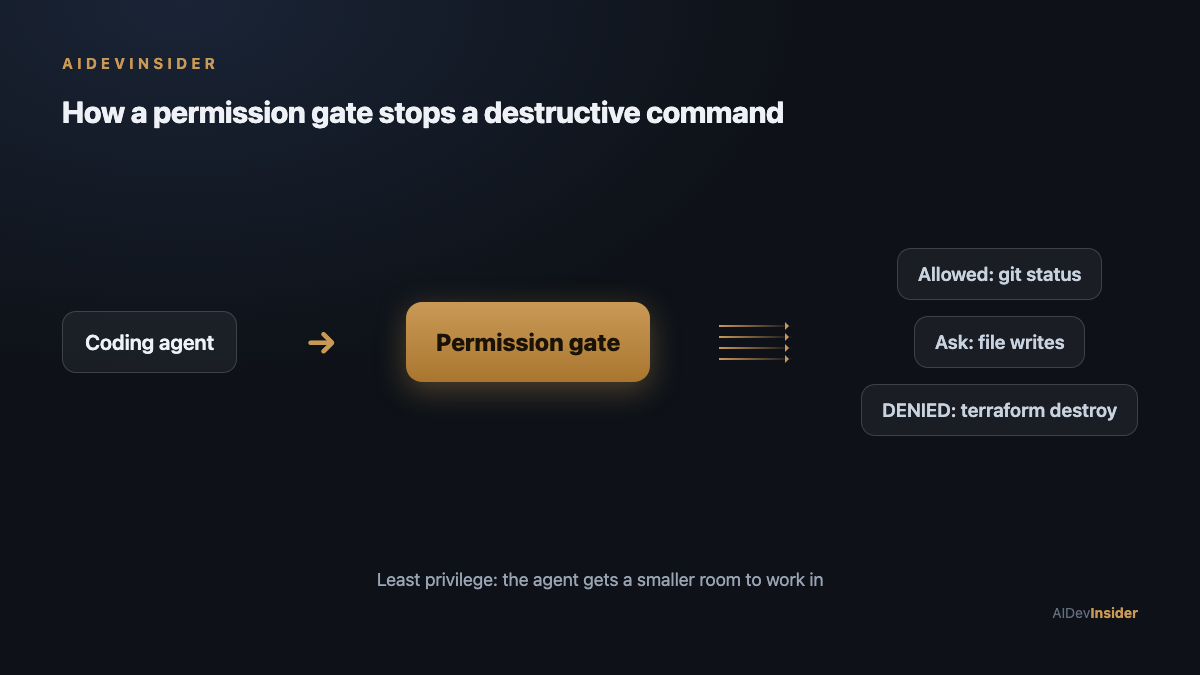
Three of these permissions matter for not losing your production database:
- Permission mode. The opposite of my setting is
manual(older docs call the middle ground “default” or “ask”). In this mode the agent pauses and asks before it runs anything it has not been pre-approved for. Slower, yes. But aterraform destroyprompt is a lot cheaper than a restore. - Deny rules.
--disallowedToolslets you name commands the agent may never run, even if it thinks it should. This is the one I care about most. You can write a rule likeBash(terraform destroy*)orBash(rm -rf*)and the agent simply cannot execute it. It is a hard stop, not a suggestion. - Allow rules.
--allowedToolsis the inverse: pre-approve only the safe, boring commands (Bash(git status),Bash(npm test)) so you get speed where it is harmless and prompts everywhere else.
What I changed, and what you should
I rewrote my settings. The defaultMode is no longer bypassPermissions. I added an explicit deny list for the commands that are never worth the risk of an agent running them unsupervised: terraform destroy, terraform apply against anything, rm -rf, drop database, git push --force, and anything that touches my cloud CLI with a delete verb.
The principle is simpler than the syntax: an agent should operate with the least privilege that still lets it do the job. That is not an AI idea. It is the oldest rule in security, and it is exactly the rule these incidents violated. The DataTalks agent should never have been in a position where a single allowed command could destroy the snapshots too. The Railway agent should never have been able to read a token from an unrelated file and act on it.
If you are running a coding agent today, stop reading and go check one thing: cat ~/.claude/settings.json (or your tool’s equivalent). If it says bypassPermissions, you are one bad plan away from the same headline. It took me thirty seconds to find and five minutes to fix.
The part that applies even if you never touch Terraform
There is a version of this that hits Indian developers and small teams especially hard. A lot of us are running these agents against client infrastructure on tight budgets, without the layered backups and IAM boundaries a large company would have. When a founder’s whole platform lives in one AWS account with one set of credentials the agent can reach, the blast radius of a mistake is the entire business. The fix is not to distrust the tools. It is to give them a smaller room to work in: scoped credentials, a deny list, and prompts on anything destructive.
The agents are getting more capable every month. The kill switch was there the whole time. Mine was just switched off, and I would bet yours is too.
Sources: AI Incident Database, incident 1424 (DataTalks.Club); reporting via Yahoo Tech and Cybersecurity News on the Claude Code file-deletion incident; penligent.ai’s write-up of the PocketOS/Railway database deletion. Tool behavior checked on Claude Code 2.1.283 on my own macOS machine, 28 September 2026.